
How to See Who Unfollowed You on Instagram With ChatGPT
ChatGPT cannot open your Instagram account, so it can never fetch that list itself. What it can do is compare two follower lists you already downloaded from Instagram and name every account that is in the older file and missing from the newer one.
How to see who unfollowed you on Instagram with ChatGPT — and where it stops
An assistant has no Instagram session. It has no password of yours, no cookie, no token, and nothing in the chat window creates one. A model with web browsing hits the same wall as any logged-out visitor: a profile page shows a follower count, never the names behind it, and a private account shows nothing at all.
So the work splits in two: you get the data; the assistant does the comparison. That second half is a real job — matching two lists of a few thousand usernames by eye is where people give up — and it is the only half an AI can take. For the bigger picture, see both ways of knowing who unfollowed you, side by side.
Why no website can do it from your username either
Your follower list is not public data in any usable sense. Instagram serves it to your own signed-in session and to nobody else, which is why a site that asks for nothing but your handle cannot produce a single name. Those pages either return your public follower count dressed up as a result, or they show a fake loading bar and then ask you to sign in.
That sign-in is the whole business model. Handing your username and password to a third-party form gives someone else the ability to post, message and change your recovery email — and it breaks Instagram’s own rule against sharing credentials. The same trap sits behind most sites that promise anonymous story viewing without an app.
The rule worth remembering: anything that reads your follower list has to run on your session. Either you export it yourself, or software you trust does it on your phone.
Download your own follower list from Instagram
This is the method that needs nothing installed. Instagram’s own export gives you the file, and the wording shifts between app versions, but the path is stable:
- In the Instagram app, open your profile, then the menu, then Settings and activity.
- Open Accounts Center, then Your information and permissions, then Download your information.
- Choose the account, then “Some of your information”, and tick only Followers and following.
- Choose to download to device, set the format to JSON and the date range to all time.
- When the email arrives, download the ZIP and open
connections/followers_and_following/followers_1.json.
That file is a snapshot of who follows you at that moment — each entry holds a username, a profile link and the date they followed. Save it somewhere you will find it again, because on its own it answers nothing. Come back in a week or a month and repeat the request. Two snapshots are the minimum; the difference between them is your answer.
Compare the two exports
Three ways, cheapest first.
By eye. Under a couple of hundred followers, open both files, scan the usernames, done.
In a spreadsheet. Paste the old usernames into column A and the new ones into column B, then in C2 put =COUNTIF(B:B,A2)=0 and fill it down. Every TRUE is an account that was there and is not any more.
With an assistant. Paste the two username lists as plain text, labelled OLD and NEW, and ask for one thing: every username that appears in OLD but not in NEW, as a list. Reverse the two labels and the same prompt gives you your new followers.
One caution that applies to all three: those usernames are other people’s data. Paste the username column and nothing else — the full export also contains your messages, login history and ad profile, none of which belongs in a chat window.
What the no-app route costs you
It only works forwards. Your first export is hour zero: anyone who left before it is invisible, permanently.
Each round trip is two requests and two waits, and the answer is only as fresh as your last export. You also have to remember to do it — the reason most people give up after the second time. And the result is a bare list of names with no date attached: you know someone left during the gap, not when, and not whether they unfollowed or deleted their account.
When an app is the better trade
An app does the same comparison, on a schedule, without the exports; the trade is a monthly or yearly plan for the names. Before trusting one, check two things: where the sign-in happens (Instagram’s own page, or a form the app drew itself — the second is a credential harvester), and where your lists are kept afterwards.
FollowerScan is built around that comparison. It signs you in on Instagram’s own login page inside the app, keeps the session and the lists on the phone, and sends every request straight to Instagram with no FollowerScan server in between; signing out clears them.
After two scans it shows Lost followers, New followers, Doesn’t follow you back and You don’t follow back, the first two reaching back 7 days. Counts are free; the names need Pro. It reports who left, and does not label anyone a bot — that is a guess no app can verify. The unfollower lists are described on the home page.
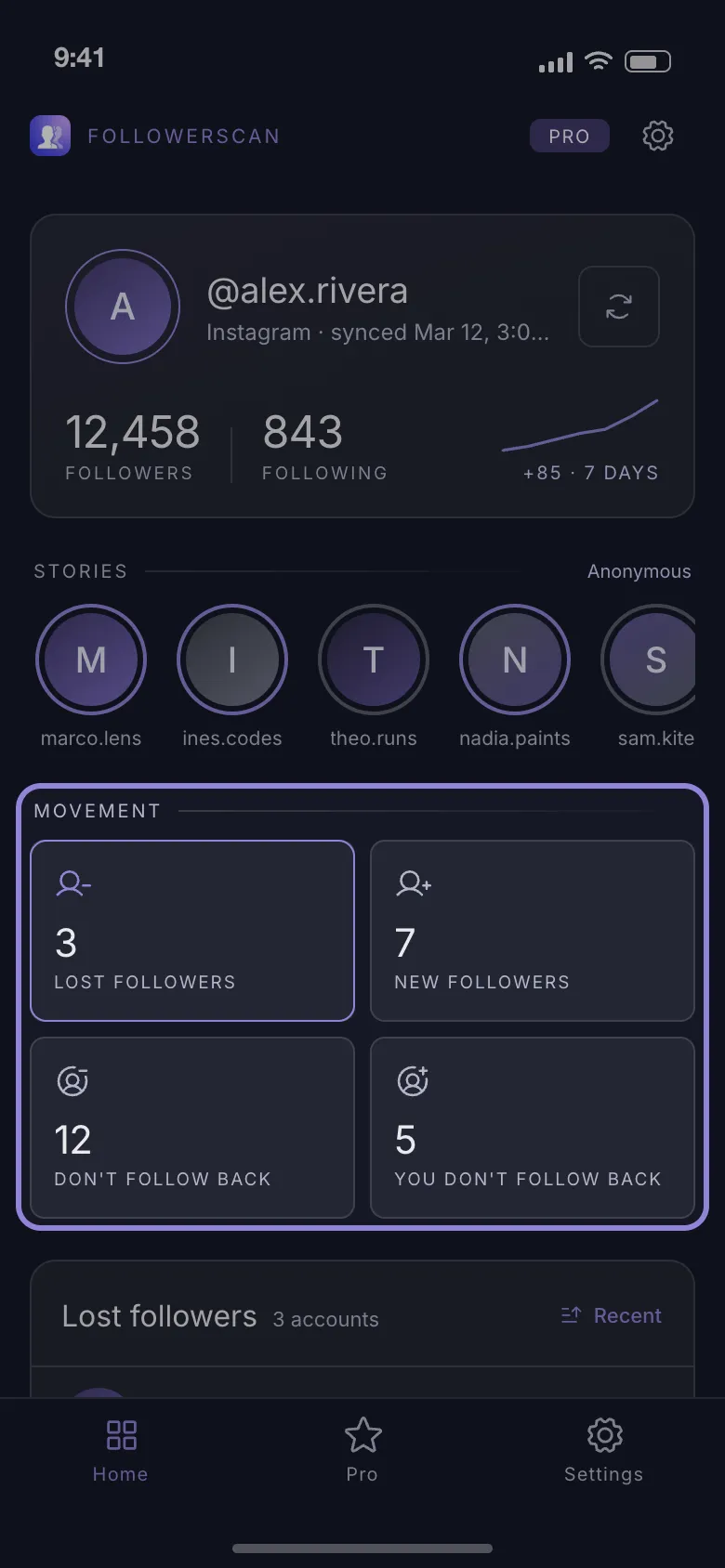
If exporting twice and diffing files is not something you will keep doing, get FollowerScan and let the scans compare themselves.
Frequently asked questions
How long does an Instagram data export take to arrive?
For a normal account with only followers and following selected, the email usually lands within a few hours. Instagram does not promise a time and warns larger requests can take much longer, so pick the smallest selection and the JSON format rather than requesting all of your information.
Can one export tell me who doesn't follow me back?
Yes, and that one needs no second snapshot. Open `following.json` next to `followers_1.json` from the same ZIP and list every username that appears in following but not in followers. The spreadsheet formula is the same one, with the following list in column A and the followers list in column B.
Does Instagram notify you when someone unfollows you?
No. Follows generate a notification; unfollows are silent, which is why the only way to notice one is to compare your follower list against an earlier copy of it. Your follower count moving is the one hint Instagram gives you, and it does not say whose name is missing.
Related articles
Keep reading with these related guides and articles
Knowing Who Unfollowed You on Instagram: Two Methods
Instagram sends no unfollow alert. Knowing who unfollowed you on Instagram means comparing two follower lists — here is...
Read moreWhy Do Girls Unfollow Me on Instagram? 5 Honest Reasons
Why do girls unfollow me on Instagram? The five reasons behind most unfollows, how to tell a misclick from a decision,...
Read moreHow to See Less of Someone on Instagram Without Unfollowing
How to see less of someone on Instagram without unfollowing, or stop seeing them at all: mute posts or stories, what...
Read more
Get FollowerScan
See every name, not just the count.
Connect your Instagram account, let the first scan finish, and refresh whenever you want to know what changed.
No password stored • Free to start • iOS and Android