
How to See Less of Someone on Instagram Without Unfollowing
Yes — mute them. To see less of someone on Instagram without unfollowing, or to stop seeing them at all: open their profile, tap the Following button, choose Mute, then turn on the toggle for their posts, their stories, their notes, or any combination. Nothing is announced. You stay a follower, keep access to their account, and their content simply stops being delivered to you.
How to see less of someone on Instagram without unfollowing, from anywhere in the app
That profile route is one of three places that write to the same mute setting. The other two are faster:
- From the story tray. Press and hold their story ring at the top of your feed and pick Mute.
- From a post. Tap the three dots above any of their posts in your feed and pick Mute.
After that, their posts stop arriving in your home feed and their story ring slides to the end of the tray in grey, where it no longer asks to be tapped. Every toggle is reversible at any moment.
Every lever short of unfollowing, and what each changes on their side
Muting is the quietest lever, not the only one. What separates them is not how much you see — it is how much of the change reaches the other person.
| Lever | What changes for you | What changes for them |
|---|---|---|
| Mute | Their posts leave your feed; their story moves to the end of the tray | Nothing |
| Add other people to Favourites | You get a second feed containing only the accounts you chose; everyone else stays in the main feed | Nothing |
| Hide your story from them | Nothing | Your stories stop appearing for them, with no marker and no explanation |
| Restrict | Their comments on your posts wait for your approval | Their comments are visible only to them, their chats go to your message requests, and they lose your activity status and read receipts |
| Unfollow | Their posts and stories leave your feed completely; a private account closes to you | Their follower count drops by one, the Follows you badge disappears from your profile when they open it, and any tracker they use names you |
Restrict is often recommended in these situations and is usually the wrong tool: it is built for someone who bothers you in public, and it barely changes what lands in your feed. Favourites is the opposite approach — instead of pushing one person down, you pull a handful of people up into their own feed.
The last row is the one the other person can check: our guide to knowing who unfollowed you on Instagram shows how they find out.
What muting does not hide
This is where people are surprised a week later. Mute covers delivery, nothing else.
- Direct messages. They still arrive in your inbox with a badge. Silencing a conversation is a separate action inside that chat.
- Tags and mentions. They can still tag you in a post or mention you in a story, and you still get the notification.
- Their profile. Every post is still on the grid, one tap away, and their name still autocompletes in search.
- Your side of the relationship. They still see you in their follower list, and your likes and comments on their posts stay visible to everyone.
- Post notifications. If you once turned on alerts for that account, mute does not switch them off — that bell is its own setting on their profile.
When you still want to see their story
Muting a story does not mean you never want to see one. The birthday, the announcement, the trip you are curious about: you open it from their profile, and your name lands in their viewers list exactly as it always did. Mute changed your feed, not their analytics.
FollowerScan is built for that gap. It shows the stories of the accounts you follow, muted ones included, and plays them without marking them as seen. Install the app, connect the account once, and the muted accounts sit in its story row like any other.
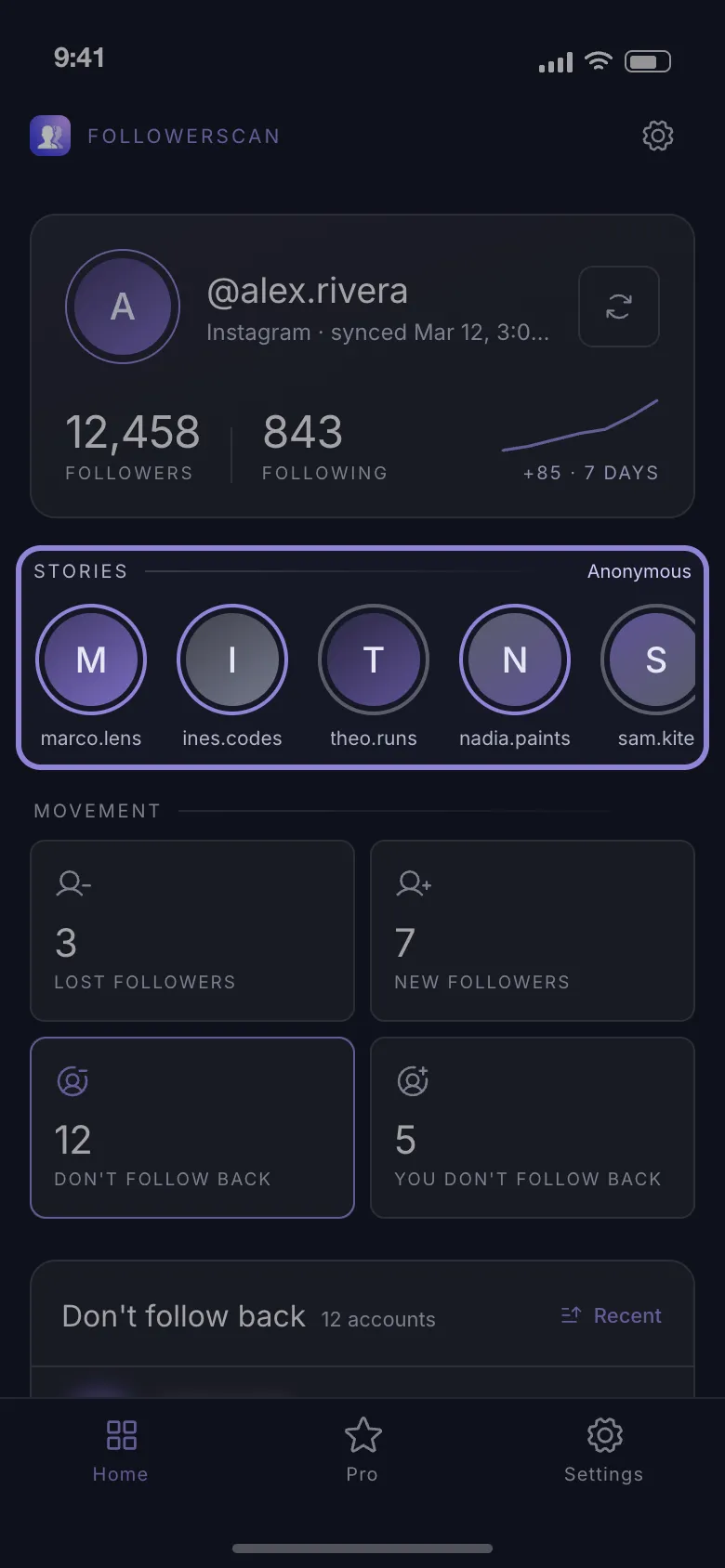
The requests go straight to Instagram, with no server of ours in between, and your session stays on your phone. The first story of each account plays free; the rest of that account’s stories need Pro, a monthly or yearly plan bought through the store. Our guide to watching Instagram stories anonymously compares that against airplane mode and viewer sites.
If you unfollow instead
Unfollowing sends no notification, so it feels invisible. It is not: the table above lists three things they can see. Before you decide, the usual reasons people unfollow on Instagram help separate a passing annoyance from a real decision.
Which raises the question people actually lose sleep over — whether they unfollowed you back — and Instagram answers it nowhere. That is the job of the unfollower and non-follower lists: it compares consecutive scans of your own lists and produces four of them, including Lost followers and Doesn’t follow you back. The new-follower and lost-follower lists reach back 7 days; the counts are free and the names are part of Pro. It reports who left and who never followed back — it does not grade accounts as bots, fakes or ghosts, and it cannot tell you why anyone left.
Mute first, decide later — and when you want to know who actually left, get FollowerScan.
Frequently asked questions
Does Instagram tell someone you muted them?
No. There is no notification, no marker on your profile and no list they can check. From their side nothing at all changes. The only hint is behavioural — if you used to reply to every story and suddenly stop, an attentive person draws their own conclusion.
Can they still see my posts and stories if I mute them?
Yes. Muting works in one direction only: it filters what reaches you. They still see everything you post unless you also hide your story from them or block them.
How do I unmute someone on Instagram?
Open their profile, tap the Following button, choose Mute and switch the toggles back off. The change is immediate and just as silent as muting was — their next post lands in your feed and their story ring returns to its normal position in the tray.
Where can I see everyone I have muted?
Instagram keeps a muted-accounts list in Settings, in the section that controls what you see and what is suggested to you. It is worth opening once a year to check who is still on it.
Related articles
Keep reading with these related guides and articles
Knowing Who Unfollowed You on Instagram: Two Methods
Instagram sends no unfollow alert. Knowing who unfollowed you on Instagram means comparing two follower lists — here is...
Read moreWhy Do Girls Unfollow Me on Instagram? 5 Honest Reasons
Why do girls unfollow me on Instagram? The five reasons behind most unfollows, how to tell a misclick from a decision,...
Read moreHow to See Who Unfollowed You on Instagram With ChatGPT
How to see who unfollowed you on Instagram with ChatGPT: what an AI assistant can really do, plus the data-download...
Read more
Get FollowerScan
See every name, not just the count.
Connect your Instagram account, let the first scan finish, and refresh whenever you want to know what changed.
No password stored • Free to start • iOS and Android