
How to Check Who Doesn't Follow Me Back on Instagram
Instagram builds no list of one-sided follows, so checking who doesn’t follow you back comes down to one operation: compare the accounts you follow against the accounts following you, and keep the names that appear only in the first list.
How to check who doesn’t follow you back on Instagram: three methods
| Route | What you need | Time for ~800 accounts you follow | Where it breaks |
|---|---|---|---|
| Compare the lists in the app | Nothing | 1–2 hours | The only record is your own notes |
| Instagram’s data download | An email address and a spreadsheet | ~20 minutes once the file arrives | A snapshot only: no history, no record of who left |
| A follow-back checker app | An install and a sign-in | Minutes per scan | The names usually sit behind a subscription |
Pick by the size of your following list. Under a couple of hundred accounts, the manual pass beats waiting for an export. Above that, the real choice is between a spreadsheet you control and an app that keeps the list current.
Compare the two lists by hand, and where that stops working
- Open your profile and tap Following.
- Tap Sort by and choose the date-followed option, earliest first. The default order re-ranks itself between loads; a date sort gives you a fixed position to return to.
- Work down the list. For each account, either open the profile and look for the Follows you label under the username, or type the handle into the search box inside your Followers list — no result means no follow back.
- Note every name that fails the check as you go, in whatever notes app you have.
Budget five to eight seconds per account: two hundred accounts is about twenty minutes.
One trap on the same screen: Least interacted with and Most shown in feed look like shortcuts to this answer. They sort by your behavior, not theirs. A friend who follows you back can sit under Least interacted with, and an account that never followed back can be missing from it.
Get the answer from Instagram’s data download
- Open Settings and activity → Accounts Center → Your information and permissions → Download your information (some builds label it Export your information).
- Choose a partial download, tick Followers and following, format HTML, date range All time. HTML is the version a spreadsheet takes by copy-paste; JSON needs an import step.
- Instagram emails a link when the file is built. A followers-only export usually arrives within minutes to a few hours; Instagram reserves up to 30 days, so request it before you need it.
- Unzip it and open
followers_1.htmlin a browser. A large account also getsfollowers_2.htmland beyond; every one of those files has to go in, or real followers come out marked “no follow back”. - Copy each list into a spreadsheet from row 2 down, keeping row 1 for headings: the followers files into column A,
following.htmlinto column B. If the follow dates come along as rows of their own, leave them: they show up as “no follow back” in step 6 and are obvious to skip — or filter column B on the year and delete them first. - In C2 put
=IF(COUNTIF(A:A,B2)=0,"no follow back",""), fill it down, then filter column C.
The export dates every follow but never records an unfollow, so only two exports from two dates can tell you who left.
This route also never hands your follower lists to a stranger: the zip lands on your own device and the comparison happens in your spreadsheet.
The app route: what to ask before you trust a follow-back checker
A checker reads the same two lists through your signed-in session, so ask these first:
- Where does the sign-in happen? On Instagram’s own login page, or in a form the tool drew itself? Never type your password into the second kind.
- Could a username-only website even do this? Instagram serves no follower or following list to a signed-out visitor. For a private account that makes it impossible; for a public one it means somebody else’s logged-in session is reading what it can of your lists, and you cannot see whose, or what it keeps.
- Does it unfollow for you? That is the feature that gets accounts action-blocked: the taps arrive at machine speed, and Instagram treats them as automation.
- Does it promise to spot fakes or ghost followers? Nothing outside Instagram can see that. Reciprocity and departures are visible in the lists; “fake” is a guess.
FollowerScan compares your two lists, and three steps get you the result:
-
Install FollowerScan and open it. Tap See it with sample data if you want to look before connecting anything.

-
Connect your Instagram account. The sign-in happens on Instagram’s own login page, inside the app.
-
Open the Don’t follow back card — one of the four follower-insight lists in FollowerScan, beside who unfollowed you, who is new, and who follows you that you don’t follow back. The count is free; the names need Pro, a monthly or yearly plan, and without it the list shows six rows with the names covered.
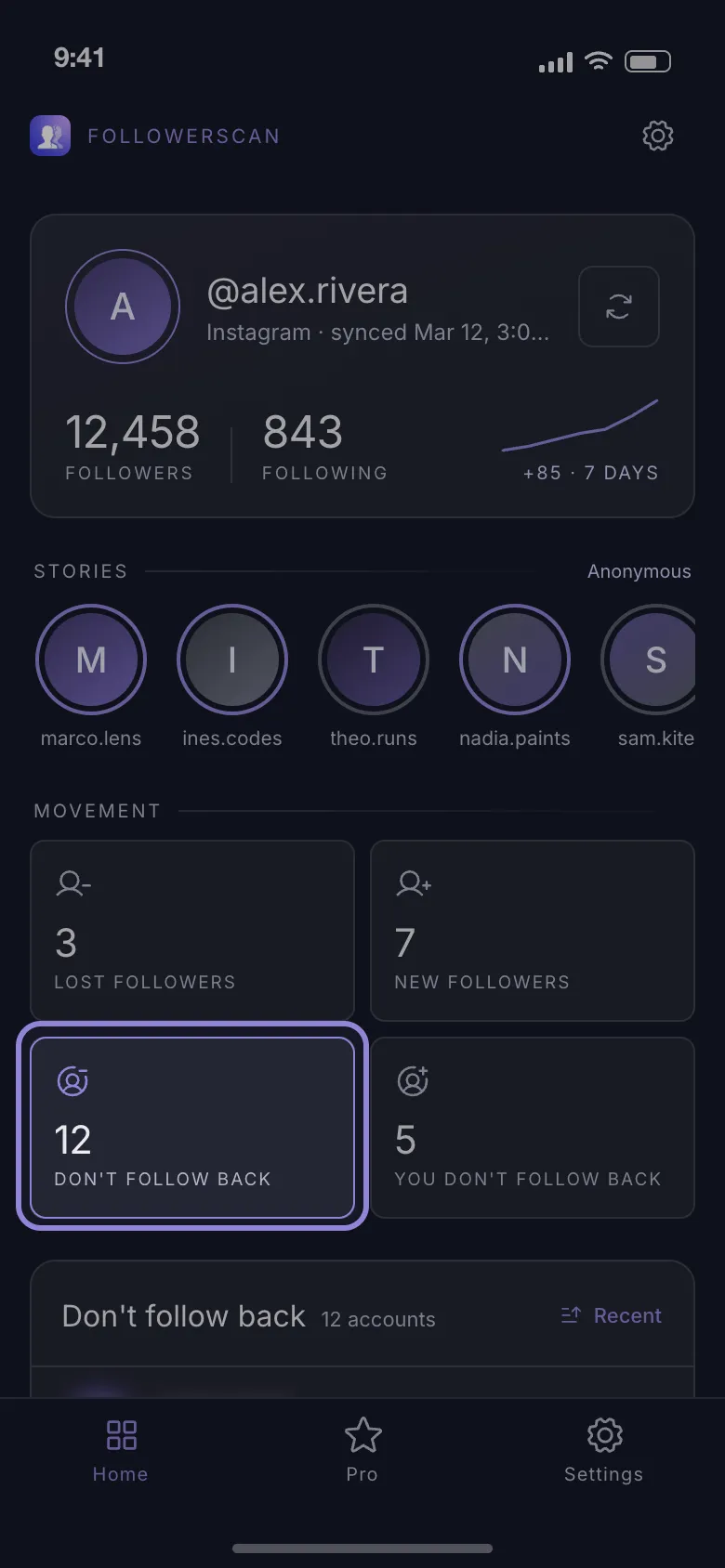
The first scan walks both lists 60 accounts at a time with a two-second pause between pages, so a large account waits minutes for it; the result is reused for 24 hours and refetched after that, and signing out clears every list it kept.
The app ships analytics, crash-reporting and billing SDKs; the follower lists are stored on the phone and are not sent to a FollowerScan server. It scores nobody as fake.
When “not following back” is not what it looks like
The finished list mixes situations that deserve different answers:
- A follow request still waiting. If your account is private, someone who asked to follow you waits under Follow requests in your notifications, not in your followers. Approve it and they leave this list.
- People who followed back, then left sit in this list beside the ones who never did.
- Dormant accounts. The handle is live, the person stopped opening Instagram years ago, and nothing you do will change that.
- Business and shop accounts often follow nobody back as a matter of policy. A bakery is not ignoring you.
- Blocks work in the opposite direction: a block severs both follows, so someone who blocked you drops out of your following list altogether instead of appearing as a non-follower.
Open a profile before you act on any name you only half-recognize.
What to do with the list once you have it
Treat it as a single decision pass with three buckets:
- Keep — accounts you actually watch: friends, artists, shops, local news. Whether they follow back has nothing to do with why you followed them.
- Mute — the option most cleanups skip. A mute keeps the follow and the connection, and empties the feed slot.
- Unfollow — accounts you followed for a reason that has expired: a follow-for-follow that never happened, an account that changed hands, a handle you cannot place.
How to unfollow non-followers without getting action-blocked
No source agrees on the number, and that is the honest starting point. Published figures for unfollows run from 50–100 a day up to 200–250 an hour, while Instagram publishes no unfollow limit at all. The real limits are rate-based and move with the account’s age, its history and how mechanical the taps look.
What follows from that disagreement is a conservative pace — treat the lowest published figure as your ceiling:
- Batches of around ten, then do something else for a while.
- A few dozen a day on an established account; under twenty on one created in the last few months.
- Spread a 300-account cleanup over a week or two rather than an evening.
An action block shows up as an Action Blocked or Try Again Later dialog, or as a follow button that quietly springs back to “Following”. It usually clears within hours, sometimes after 24 to 48, and hitting it again can extend the window — so when it appears, stop for the day instead of retrying.
Nothing you install or pay for can lift a restriction. If one outlasts a couple of days, Instagram’s own appeal is the only route back: the “Tell us” link inside the dialog, or Settings and activity → Help → Report a problem.
FollowerScan has no unfollow button: it cannot follow, unfollow, block or message anyone. You press the buttons, at the pace you choose. Download FollowerScan and the count of your one-sided follows is there as soon as the first scan finishes — the names with a monthly or yearly plan.
Frequently asked questions
Does unfollowing someone notify them?
No. Instagram sends no notification for an unfollow and puts nothing in the other person's activity feed. What can surface it is on their side: their follower count drops by one, your name is gone from their followers list, or they run a tracker of their own.
Does this work if my own account is private?
Yes. Every method here reads your own two lists, and a private account can always see both of its own. The privacy setting changes who can look at your lists, not whether you can.
Does unfollowing a lot of accounts hurt my reach?
Instagram has never said that unfollowing changes how your posts are distributed, and nobody outside the company can measure it. What does change, measurably, is your own feed and the recommendations built on what you follow.
Can I check who doesn't follow me back from a computer?
Yes. On instagram.com both lists open as scrollable dialogs, though Ctrl+F only finds the names already loaded, so you still have to scroll to the bottom before searching.
Related articles
Keep reading with these related guides and articles
How to See Recent Followers on Instagram, in Order
How to see recent followers on Instagram: where the newest names really are, why your followers list is not...
Read moreHow to Check if Someone Follows You on Instagram
How to check if someone follows you on Instagram in under a minute: the phone method, the desktop version, and what to...
Read moreKnowing Who Unfollowed You on Instagram: Two Methods
Instagram sends no unfollow alert. Knowing who unfollowed you on Instagram means comparing two follower lists — here is...
Read more
Get FollowerScan
See every name, not just the count.
Connect your Instagram account, let the first scan finish, and refresh whenever you want to know what changed.
No password stored • Free to start • iOS and Android