
How to Check if Someone Follows You on Instagram
Here is how to check if someone follows you on Instagram: open your own profile, tap “Followers” and type their username into the search box at the top. If the account appears, it follows you. This works whether or not you follow them back, and whether or not their account is private — it is your list, not theirs.
Type the username, not the display name
Search the handle: a display name you half-remember is hit-and-miss, and “No results found” reads exactly like “they don’t follow you” — so copy the handle from their profile before you search.
There is a second route, faster if you are already on their profile: tap “Following” there and search for your own username. It breaks on a private account you do not follow, because its lists are hidden. Your own followers list never does.
There is also a signal you get for free: if you do not follow an account and its profile button reads “Follow back” instead of “Follow”, that account already follows you. Once you follow them, the button switches to “Following” and stops telling you anything about their side of the relationship.
Checking one name is a different job from seeing who followed you lately: how to see recent followers on Instagram, in order covers the activity feed and the dated data download.
Instagram has no “follows you” badge
Other networks put a small “Follows you” tag under the username. Instagram’s profile has never shown one.
This is why so many guides recommend a page-source trick: open a profile on the desktop web, view the page source, and search for a follows_viewer flag. It worked years ago, when Instagram shipped profile data as JSON inside the HTML. That data is no longer in the page you can view, so the search returns nothing today. If a post tells you to try it, check its date.
How to check if someone follows you on Instagram from a desktop browser
The desktop web is faster for this, because you have a real keyboard:
- Go to instagram.com and open your profile from the left sidebar.
- Click “followers” in the header row — the list opens in a dialog.
- Type the username in the dialog’s search field.
One thing differs from the phone: your browser’s own find-on-page (Ctrl+F or Cmd+F) is useless here. The dialog loads names in small batches as you scroll, so the browser only searches what has already loaded. As on the phone, search the handle; a display name is hit-and-miss.
When your follower list is too long to scroll
Searching one name at a time is fine for one person. It falls apart in three situations: you want to check twenty accounts, you want to know who stopped following you, or you want the whole list, not one name — and a list in the thousands cannot be scrolled to the bottom.
Instagram’s own answer is the data download. In Settings, under Accounts Center, “Your information and permissions” → “Download your information” lets you request your followers and following lists as a file. It is free and complete, but it arrives by email hours or days later, and one download is a snapshot: to see changes you need two of them and a way to compare.
That comparison is what a tracker automates. FollowerScan pulls your full follower and following lists from your own connected account and compares consecutive scans, so instead of searching names you read lists: New followers, Lost followers, You don’t follow back (they follow you, you do not) and Doesn’t follow you back (you follow them, they do not). The counts are free; seeing the names inside a list needs Pro, a monthly or yearly plan. The new and lost lists reach seven days back — a tracker cannot recover a change that happened before it started scanning.
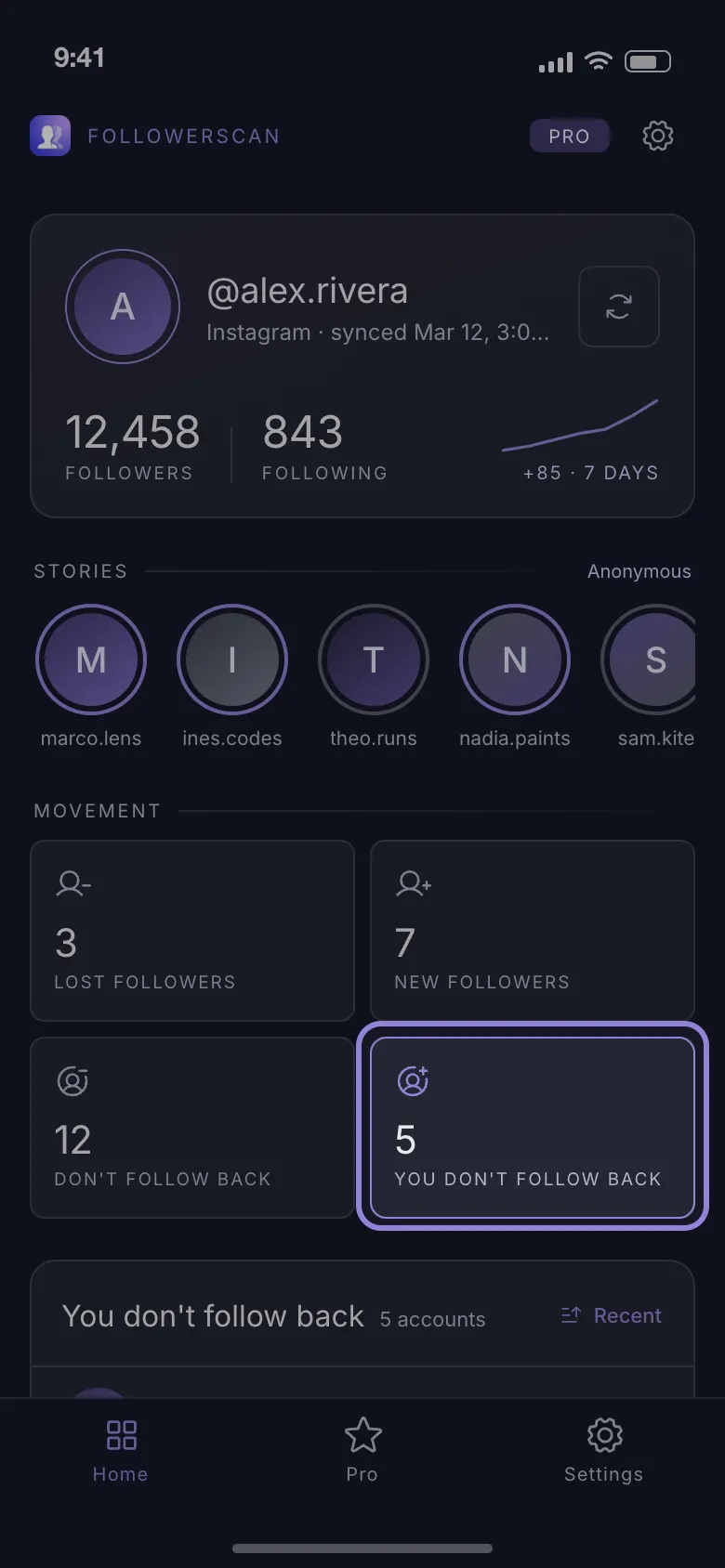
To set it up:
-
Install FollowerScan from the App Store or Google Play.
-
Open it and tap Connect Instagram.
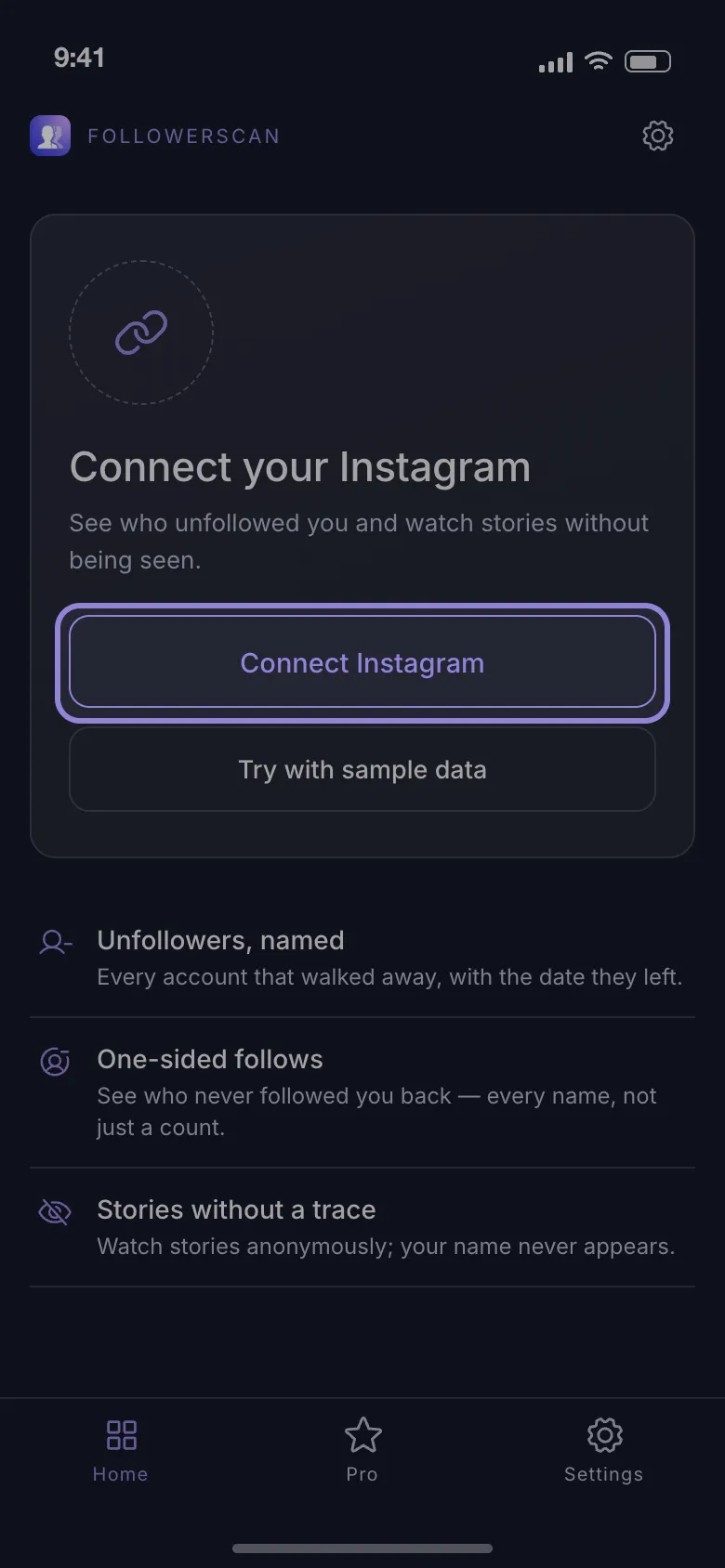
-
Sign in on Instagram’s own login page, which opens inside the app — the session and your lists stay on your phone, and every request goes straight to Instagram.
-
Wait for the first scan. It walks your lists page by page: a minute or two, longer on a large account.
After that, the round-arrows button beside your username runs a fresh scan, and the follower and unfollower lists fill with what changed since the last one. Two honest limits: it reads only the account you sign in with, so it can say nothing about anyone else’s followers, and it never labels an account as fake or a bot — it reports who does not follow back and who left, not what kind of account they are.
Business and creator accounts: what Insights adds
Switching to a professional account gives you Insights, which reports followers gained and lost over a chosen range (a week, a month, longer), plus locations and active hours. Those are aggregate numbers: Insights never names the person who followed or unfollowed you, so it cannot answer “does this one account follow me”. Switch back to a personal profile and the reporting goes with it, which makes Insights a growth dashboard rather than a way to verify one relationship.
Restricted and blocked accounts
Restricting someone changes nothing about following. A restricted account stays in your followers list and keeps seeing your posts; only their comments and message notifications are affected.
Blocking is different. When either side blocks, Instagram removes the follow in both directions — so a blocked account disappears from your followers list. From your side, a name that vanished could mean an unfollow, a block, a deactivated account or a deleted one, and Instagram never says which. A deactivated account reappears in the list, with your follower count, when its owner comes back.
Check one account, and the search box is all you need. Check a hundred, or watch who leaves, and you need something that remembers your list between visits — FollowerScan does that on your own account, free to install.
Frequently asked questions
Does Instagram notify you when someone follows you?
Yes — a new follower produces a notification in your Activity tab, and a push notification if you have those switched on. The catch is that the tab only keeps recent activity and mixes follows in with likes and comments, so a follow from three weeks ago is usually gone or buried. It also shows nothing when that person later unfollows you.
Will someone know I looked at their followers list?
No. Instagram sends no notification for profile views, followers-list views or searches inside a list. The only actions that are visible to the other account are the ones that leave a trace: following, liking, commenting, replying to a story, or viewing a story as yourself.
Why do third-party unfollower apps get flagged as risky?
Many of them ask for your Instagram password on their own screen and store it on their servers, and some perform bulk follows or unfollows for you, which triggers Instagram's action blocks. Judge any tool by two things: where you type your password, and whether it acts on your account or only reads lists.
How do I find out when someone followed me?
Instagram does not show a follow date anywhere, and the followers list is not strictly chronological once the account gets large. The only practical way is a tool that records your follower list and compares scans, so you learn of a follow at the first scan after it happens.
Related articles
Keep reading with these related guides and articles
How to See Recent Followers on Instagram, in Order
How to see recent followers on Instagram: where the newest names really are, why your followers list is not...
Read moreKnowing Who Unfollowed You on Instagram: Two Methods
Instagram sends no unfollow alert. Knowing who unfollowed you on Instagram means comparing two follower lists — here is...
Read moreWhy Do Girls Unfollow Me on Instagram? 5 Honest Reasons
Why do girls unfollow me on Instagram? The five reasons behind most unfollows, how to tell a misclick from a decision,...
Read more
Get FollowerScan
See every name, not just the count.
Connect your Instagram account, let the first scan finish, and refresh whenever you want to know what changed.
No password stored • Free to start • iOS and Android