
How to See Follower Growth on Instagram (2026)
To see follower growth on Instagram, open Insights, then Total followers — in the phone app, on a business or creator account, up to 90 days back. A personal account only ever shows today’s number. This guide covers that path, what to do without a professional account, and how to find out who caused a spike.
How to see follower growth on Instagram in Insights
Insights is the only native history Instagram gives you. On a business or creator account:
- Open your profile and tap the professional dashboard (or the menu, then Insights).
- Tap the total followers figure to open the audience view.
- Choose a range, from the last 7 days up to the last 90.
- Read the graph. It plots followers gained and lost per day, with the net change for the range underneath.
Four limits decide whether this is enough for you. The range stops at 90 days — there is no way to ask for last year. The follower graph is a phone-app feature, so the desktop site will not give you the same view. The data starts the day you converted to a professional account: switching today does not retrieve the past. And audience data, growth included, only appears once the account has at least 100 followers; under that, the screen stays empty however long you wait.
What a personal account can see, and what converting costs
A personal account shows one number, the one on your profile, and it is current-state only. Instagram keeps no follower history you can open, so yesterday’s number is gone unless you wrote it down.
Converting to a creator or business account is free, takes about a minute, and you can switch back. Your posts, your followers and your username all stay — your privacy setting does not.
The catch is timing. Insights begins collecting when you convert, so you wait a full quarter for a complete 90-day graph and never recover the months before. The second catch is exposure: a professional account cannot be private; the category label and contact buttons it adds can be hidden.
If neither the wait nor the label appeals, the alternative is to record the counts yourself — a spreadsheet, or an app that writes the number down each time it scans.
What a follower tracker actually does
Every follower tracker, whatever the marketing says, does three things: it signs in as you, downloads your full follower and following lists, and compares that download with the previous one.
That comparison is the whole product. New followers, lost followers, accounts you follow that do not follow back, accounts that follow you and you do not follow back — four views of one diff. The follower count it saves at each scan is what becomes a graph.
Two consequences people discover late. No tracker can show you last spring: its history starts at your first scan, not at your first follower. Its history is also only as dense as your scans, so a follower who arrived and left while you had the app closed for two weeks never appears in either list.
The part Insights cannot do: who drove the spike
A graph says +38 on Tuesday. It does not say which thirty-eight, and that is usually the question behind the question.
Say you posted a reel on Monday night. Wednesday morning the graph shows the jump, and the list of accounts that arrived in that window shows mostly accounts in your niche: the reel found the right audience, and it is worth making another. If the same jump is made of accounts with no posts and 4,000 followings, the reel found a follow-for-follow pocket instead — same +38, opposite conclusion.
Drops read the same way. Minus twelve on Thursday is a number; twelve names, half of which you recognise as people you unfollowed last week, is an explanation.
A diff names accounts and timing, never a motive, so read it against what you published that day. Getting one means handing an app your session, which is where the choosing starts.
What a tracker needs from you, and what it should never ask
Instagram shows a follower list only to a signed-in client. Any website that promises to name your followers, or someone else’s, from a username alone is either reading the public count or making it up.
So every real tracker needs a session, and there are two ways to get one:
- On Instagram’s own login page, opened inside the app, where you type into Instagram’s form.
- On a form the tool hosts itself, where your password lands on somebody else’s server first.
Only the first keeps your password out of a third party’s hands. No app needs you to type your Instagram password into its own screen, and one that asks should be closed.
Then ask where the session lives afterwards. On the phone, it disappears when you sign out or delete the app. On a company’s server — the arrangement that lets a web dashboard scan on a schedule and e-mail you a weekly report — it sits somewhere you cannot wipe yourself.
Last, check what the free tier caps. Most trackers give the counts away and put the names behind a subscription.
How FollowerScan tracks followers over time
FollowerScan is the phone-side version of that pattern: it scans your account, keeps the daily counts on the device, and names what changed. The landing page explains how follower tracking works in FollowerScan in the same terms.
-
Install FollowerScan: get it for iPhone or Android.
-
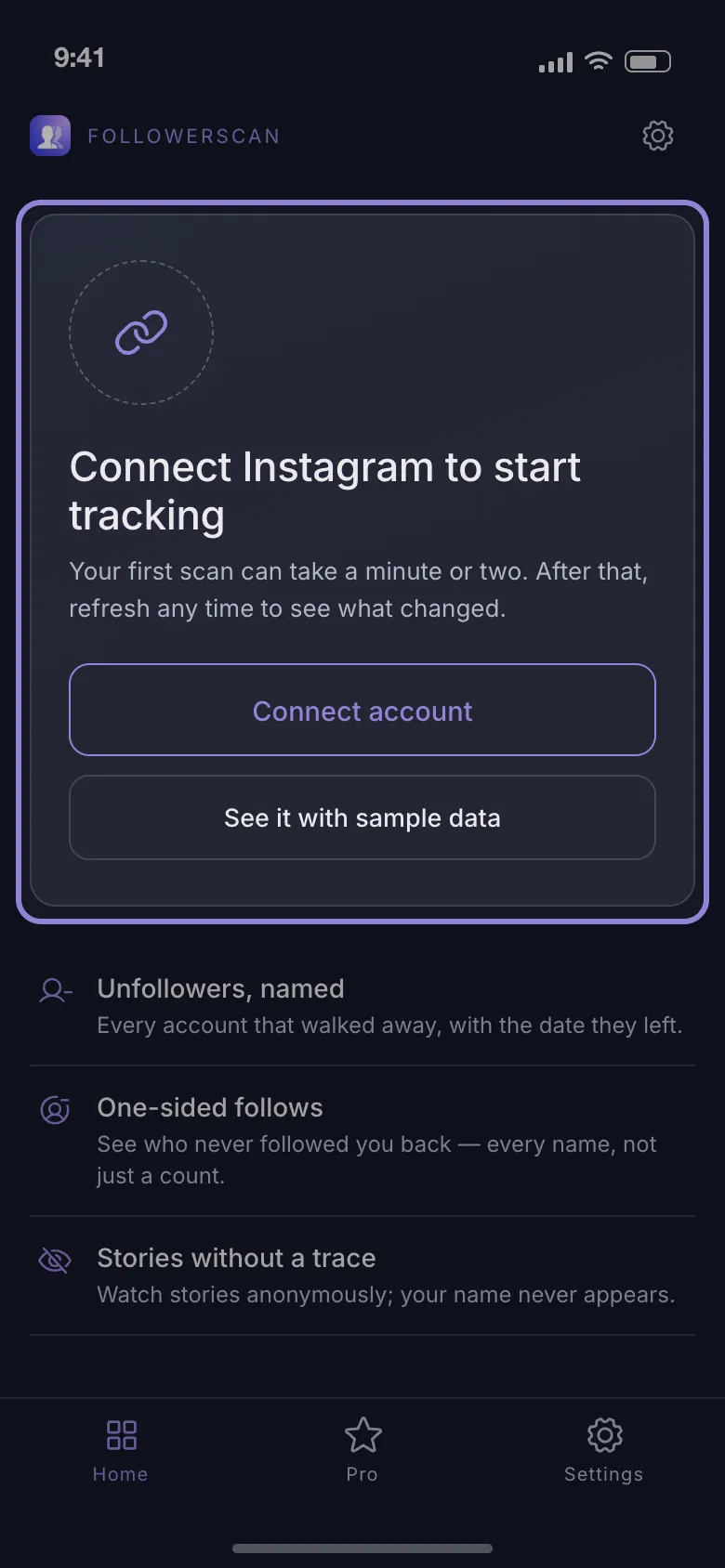
Open it and tap Connect account. To look around first, See it with sample data fills every screen with example accounts.
-
Sign in on Instagram’s own login page, which opens inside the app.
-
Wait for the first scan. It walks your lists 60 accounts per page with a 2-second pause between pages, so a large account takes a few minutes.
-
Come back later and tap the round-arrows button beside your username on the Home tab. A stored scan older than 24 hours is refetched rather than reused.
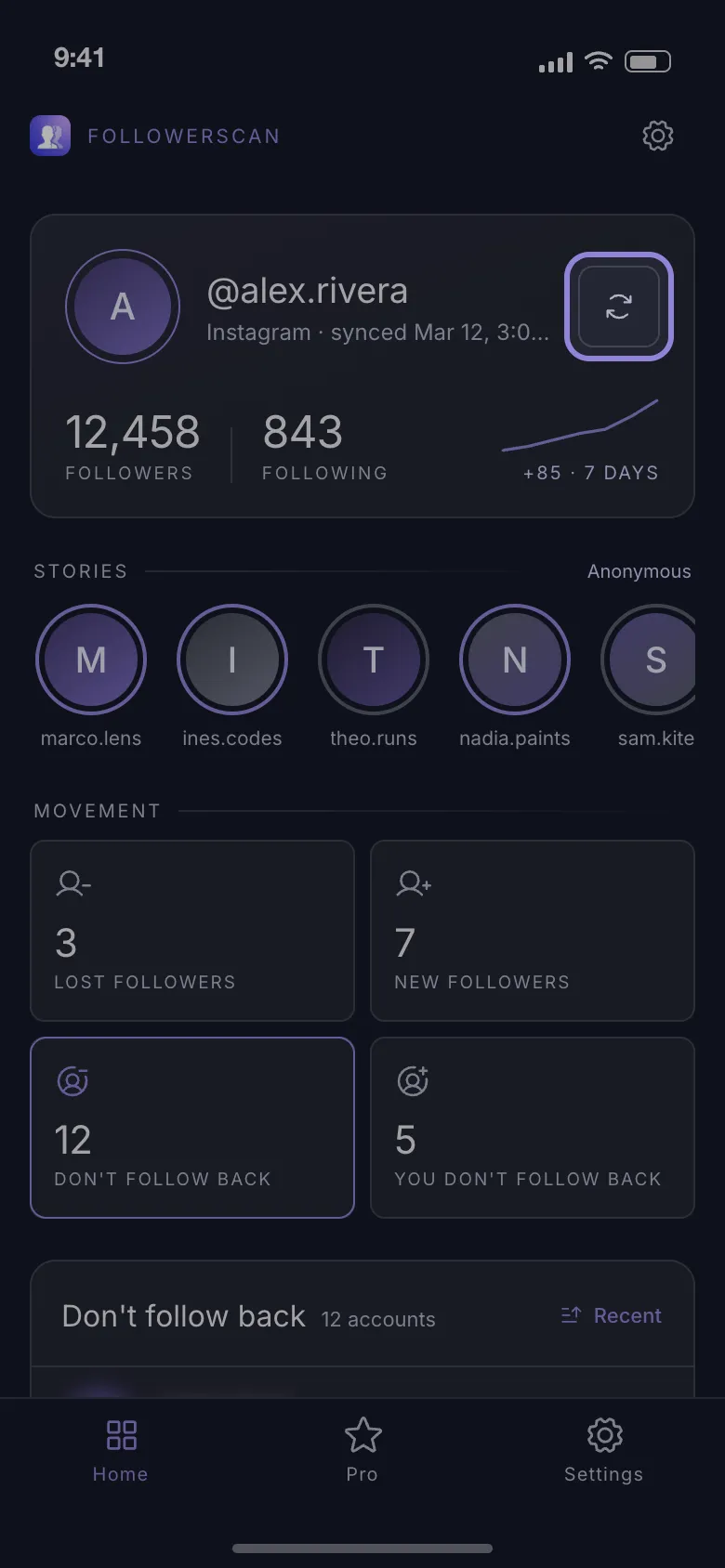
What that gives you: the header shows Followers and Following with a trend over the last 7 days, the daily counts stay on the phone for 30 days, and the new and lost lists reach back 7 days. Counts are free. The names in those lists need Pro, a monthly or yearly subscription — without it an insight list shows six blurred rows.
On the trust question: before that login page loads, cookies and web storage are cleared; session replay is paused while it is on screen; every follower request goes straight to Instagram with no FollowerScan server in between. The session and the lists are stored on the phone, and signing out clears them. The app only reads — the two lists, the four comparisons built from them, and stories from accounts you already follow — and there is no bulk-unfollow button in it. What we will not claim is “nothing ever leaves your phone”: the app ships analytics, crash-reporting and billing SDKs like most apps in the stores.
And the honest trade: 30 days of stored counts is shorter than Insights’ 90. You are swapping graph length for names.
When the count and the list disagree
They will, and it is rarely a bug. The profile count updates the moment someone follows you. A list has to be walked page by page, so what you get is a photograph taken at the start of the scan — anyone who arrived during it lands in the next one.
A deactivated account adds to that: it can drop out of your count before it disappears from the list, or the other way round, which is why two trackers scanning four hours apart report different totals for the same day.
The working rule: the profile count answers how many, the list answers who. When a list comes back two or three short, refresh before assuming something broke.
Rules, limits and what actually gets accounts blocked
Instagram’s terms do not endorse third-party clients, so it helps to know where the real risk sits. Reading is one activity; acting on your behalf is another — follow/unfollow bots, DM blasts, comment spam, engagement pods. Those earn the punishment ladder: a few hours of “action blocked”, then days, then a disabled account.
Expect a login challenge the first time a tool signs in — a six-digit code by SMS or from your authenticator, or a “was this you?” prompt — because the sign-in looks like a new device. Complete it on Instagram’s page or in Instagram’s own app, then reconnect. In FollowerScan, an expired session shows Session lost. Reconnect to resume tracking. and a Reconnect account button takes you back to Instagram’s login page.

Speed is the other tell. A scanner that hammers Instagram’s endpoints gets throttled, and the account behind it is the one Instagram notices.
Pick by the question you are asking. For a 90-day graph on a professional account, Insights is free and already there. For a month of daily counts and the names behind each spike on a personal account, start with FollowerScan and let the first scan set hour zero.
Frequently asked questions
Does Instagram tell anyone when I check my followers?
No. Instagram has no notification for profile views or for someone opening a follower list, and reading your own lists is invisible to the accounts in them. Nobody is told that you looked, that you noticed an unfollow, or that you use a tracker.
Can a follower tracker tell me which followers are fake?
Not honestly. A tracker compares two lists, so it can name who arrived, who left and who never followed back. It does not score an account as fake or as a bot — that judgement needs you to open the profile and look at the posts, the bio and the follower-to-following ratio.
Can I track follower growth on someone else's account?
No. A tracker reads the lists of the account it is signed in with, which is yours. For any other account, all that is visible is the public follower number on the profile, with no history and no names — and nothing at all if the account is private and you do not follow it.
Do I lose my follower history when I change phones?
With an app that stores its counts on the device, yes: the new phone starts a fresh history from its first scan, and the old daily counts stay behind. Instagram Insights is the opposite — it is tied to the account, so it follows you to any phone you sign in on.
How often is it worth checking follower growth?
Once a week is enough for most personal accounts and lines up with a seven-day trend. Check the day after a post that travelled, when the new followers are still recent enough to be listed, and after any week where the number moved more than usual.
Related articles
Keep reading with these related guides and articles
Instagram Follower Growth Strategy: Reels, Stories, Ads
An Instagram follower growth strategy for Reels, Stories and ads: what each format does to your follower count, and how...
Read moreHow to See Recent Followers on Instagram, in Order
How to see recent followers on Instagram: where the newest names really are, why your followers list is not...
Read moreIs It Safe to Use an Anonymous Story Viewer App?
Is it safe to use an anonymous story viewer app? It depends on what it asks for. How a view is recorded, seven checks...
Read more
Get FollowerScan
See every name, not just the count.
Connect your Instagram account, let the first scan finish, and refresh whenever you want to know what changed.
No password stored • Free to start • iOS and Android