
How to See Stories From Accounts I Muted on Instagram
Muting an account never took its stories away from you — it only moved them. You can still open a muted account’s story from their profile or from the muted row at the end of your story tray, and neither route unmutes anything.
How to see stories from accounts I muted on Instagram
Two routes, both about three taps:
- Their profile. Search the username, open the profile, and tap the profile picture when a ring sits around it. The story plays full screen, exactly like any other.
- The end of your tray. On your home feed, drag the row of story rings to the left until you pass the last unmuted account. Muted accounts collect there in their own group, with dimmed rings; tapping one plays it.
Both routes report the view: your name lands in the poster’s viewers list within seconds, as if you had never muted them.
What muting actually changed
Four things, and no more:
- You still follow them. The follow is untouched, neither account’s counts move, and nothing about their access to you changed.
- Their stories left the front of the tray. Instead of sitting near the start with everyone you follow, they sit past the last unmuted ring.
- Posts and stories mute separately. You can silence someone’s stories and keep their posts, or the reverse.
- Nothing moved on their side. Your stories, posts and replies reach them exactly as before; a mute is not a soft block.
Watch a muted story without leaving a view
If you muted someone to get some distance, the viewers list is the part that undoes it. You open one story out of curiosity, and an hour later they know you were there.
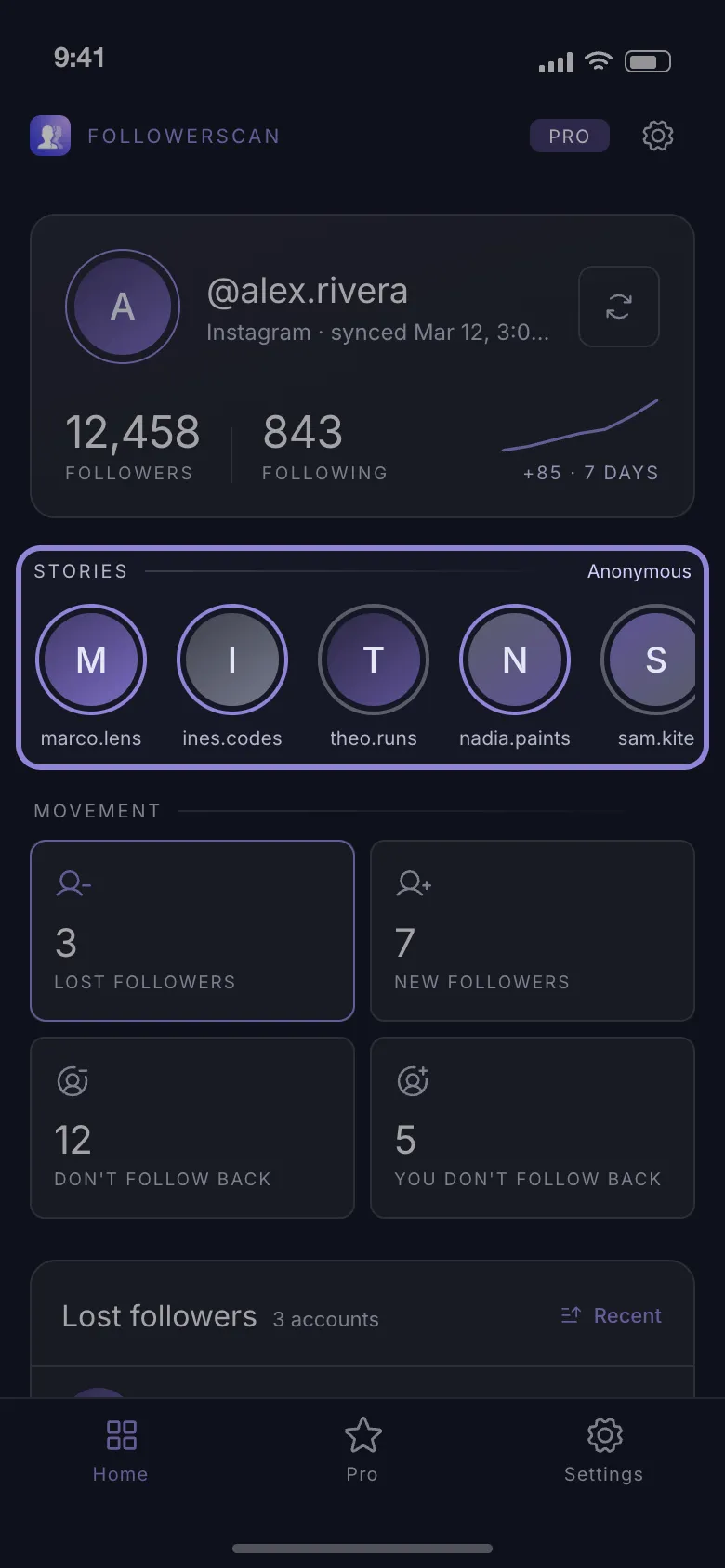
FollowerScan closes that gap. It lists the accounts you follow, muted ones included — muting never unfollowed anybody — and plays their stories from Instagram’s own feed endpoints without ever calling the “seen” endpoint, which is what keeps your name off the viewers list. That is anonymous story viewing: the first story of each account plays free, and the rest of that account’s stories need Pro, a monthly or yearly plan.
-
Install the app from the App Store or Google Play.
-
Open it and tap Connect account. To look around first, See it with sample data fills every screen with example accounts.
-
Sign in on Instagram’s own login page, which opens inside the app. The session and your lists are kept on the phone, and requests go straight to Instagram.
-
Wait out the first scan — a minute or two, longer on a large account, because it walks your follower and following lists 60 accounts at a time.
-
On the Home tab, open the Stories row and tap the account you came for.
The reach stops at accounts you already follow. Someone you never followed, or unfollowed after muting, is out of range.
Find your muted list on iPhone and Android
The path is the same on both: your profile, the three lines at the top right, then Settings and activity. Instagram has shuffled this entry between versions and platforms, so rather than hunting through the groups, tap the search field at the top of that menu and type “muted” — the muted accounts list comes up first on either phone.
Tapping an account in that list opens its own switches for posts and stories, so you can bring the stories back and leave the posts muted. There is no select-all and no bulk unmute: a long list is cleared one row at a time, and doing it from that list is far quicker than opening twenty profiles.
Clearing the list brings back everything you muted those accounts for. If you only wanted one story out of one of them, get FollowerScan and watch it without joining the viewers list.
Frequently asked questions
Can a muted account tell they have been muted?
We won't guess at what Instagram signals privately — no third-party app can verify it either way. What a person can notice is behavioural: someone who used to reply to every story goes quiet, and story reactions stop arriving. The part you can actually control is the viewers list, which only records the times you open a story inside Instagram.
Does unmuting put their stories back in the main tray?
Yes. Once an account is unmuted, its ring returns to the main story row instead of the muted group at the end, and nothing about the follow changes. Anything posted while the mute was on is still watchable until it expires.
Is muting the same as restricting on Instagram?
No. Muting only changes what you see: their stories and posts stop reaching the front of your feed. Restricting works on their side of the conversation instead — it filters their comments and moves their messages to requests. Neither one unfollows or blocks the account.
Can you see a muted account's story after it expires?
It leaves the tray 24 hours after it was posted, muted or not — unless the poster saved it to a highlight, which stays on their profile, so that is worth checking. Nothing recovers a story that was not saved.
Related articles
Keep reading with these related guides and articles
How to Watch Instagram Stories Anonymously: What Works
How to watch Instagram stories anonymously: which tricks still work, why airplane mode fails, and how to view a story...
Read moreIs It Safe to Use an Anonymous Story Viewer App?
Is it safe to use an anonymous story viewer app? It depends on what it asks for. How a view is recorded, seven checks...
Read moreHow to See Less of Someone on Instagram Without Unfollowing
How to see less of someone on Instagram without unfollowing, or stop seeing them at all: mute posts or stories, what...
Read more
Get FollowerScan
See every name, not just the count.
Connect your Instagram account, let the first scan finish, and refresh whenever you want to know what changed.
No password stored • Free to start • iOS and Android